PLAYBASIC SOURCE CODES


Find Newest File Within Folder

Find Newest File Within Folder

  Needed a function to find the newest file (via last write date) from a folder while writing a PlayBASIC backup tool.

PlayBASIC Code:
    ;  this will be the folder of this running project
    Path$=currentdir$()

    ; Search the this path for the newest PBA file (playbasic source code)
    File$ = FindNewestFileInFolder(Path$, "pba")

    print path$
    print File$

    Sync
    waitkey
COMMANDS USED: CURRENTDIR$ | PRINT | SYNC | WAITKEY |

#1
2025-11-19 - Find Newest File In Folder.zip (8.08 KB)

Shape Radial Noise Demo


PlayBASIC Code:
    setfps 60
    
    Shape    =10 
    CreateConvexShape Shape, 50, 60  
    Work = CloneShape(Shape)

    CurrentRGB    = $ff00ff
    NextRGB        = $00ff00
    

    STartTime = timer() and $7fffffff

    Do

          Cls 0

            CurrentTIME = (timer() and $7fffffff)
            TimePast#    = CurrentTime - STartTIME
            TimeScale#    = cliprange#(TimePast#/5000,0,1)
                
          phase# = phase# + 1.5

            inkmode 1+32
            Max        = 12
            for lp =1 to Max-1

                    copyshape Shape,Work
            
                  phase2# = phase# + (lp*10.5)
                    
                ; Apply radial wobble
                    Shape_RadialNoise(Work, 20.0*cos(360*TimeScale#)*5, 10.0, phase2#)

                    Scale#= float(Max)/lp
                    RotateShape Work , (360 * cos(Scale#)), 0.1+Scale#
                    
                    ThisRgb1 = rgbfade(CurrentRGB    ,Scale#*100) 
                    ThisRgb2 = rgbfade(NextRGB        ,(1-Scale#)*100) 
                    ThisRgb    = rgbAlphablend(ThisRGB1,ThisRGB2,TimeScale#*100) 
                            
                    ink ThisRGB
                ; draw shape in middle of screen
                    DrawShape Work, GetScreenWidth()*0.5, GetScreenHeight()*0.5, 2  ; filled
            next

;            print phase#

            if TimeScale#=1
                StartTIME = CurrentTIME
                CurrentRGB = NExtRGB 
                NextRGB = rndrgb()
            endif

        
      Sync
    Loop spacekey()


; ------------------------------------------------------
; Shape_RadialNoise()
; Applies sinus radial distortion around shape centre
; ------------------------------------------------------
Function Shape_RadialNoise(shp, Amp#, Freq#, Phase#)

    local cx# = ShapeCentreX#(shp)
    local cy# = ShapeCentreY#(shp)

    local vx#, vy#, dx#, dy#, dist#, ang#, off#

    For i = 0 To GetShapeVerts(shp)-1

        ; get existing vertex
        vx#    =GetShapeVertexX(shp,i)
        vy#    =GetShapeVertexY(shp,i)
        
        ; direction from centre
        dx# = vx# - cx#
        dy# = vy# - cy#

        dist# = Sqrt(dx#*dx# + dy#*dy#)

        ; avoid division-by-zero
        If dist# = 0 Then Continue

        ; unit vector
        ux# = dx# / dist#
        uy# = dy# / dist#

        ; angle of vertex around centre
        ang# = ATanFull(dy#, dx#)

        ; radial noise offset
        off# = Sin(ang# * Freq# + Phase#) * Amp#

        ; apply
        vx# = vx# + ux# * off#
        vy# = vy# + uy# * off#

        SetShapeVertex shp, i, vx#, vy#

    Next

EndFunction


Function ShapeCentreX#(shp)
    For i = 0 To GetShapeVerts(shp)-1
        sum# += GetShapeVertexX(shp, i)
    Next
    Sum#    /= GetShapeVerts(shp)
EndFunction Sum#

Function ShapeCentreY#(shp)
    For i = 0 To GetShapeVerts(shp)-1
      sum# += GetShapeVertexY(shp, i)
    Next
    Sum#    /= GetShapeVerts(shp)
EndFunction Sum#


Function CloneShape(SrcShape)
        DestShape=GetFreeShape()
        CopyShape SrcShape,DestShape
EndFunction DestShape


Parallax Scrolling Example

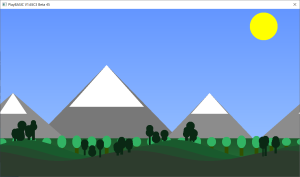
This example demonstrates a simple multi-layer parallax scrolling effect built entirely in PlayBASIC. It uses three background layers — a sky, a mountain range, and a rolling foreground hill — each scrolling at different speeds to create the illusion of depth and motion.

The sky layer drifts gently in the distance, giving a calm backdrop for the brighter sun and gradient sky tones. The mountain layer sits in the mid-ground, with snowy peaks and a forest fringe that scrolls a little faster. Finally, the foreground layer features smooth sine-wave hills dotted with silhouetted trees, moving at full speed to anchor the scene.

Together, these layers create a classic 2D side-scrolling effect, similar to what you’d see in retro platformers and adventure games.
The result is smooth, continuous motion where each layer reacts naturally as the camera moves — a timeless technique for adding life and depth to 2D worlds.


Attached Bellow:

Parallax-Scrolling-Example.png
#1
2025-11-06 - Parallax Scrolling Demo.zip (4.17 KB)

2D Fractal Mountain Parallax

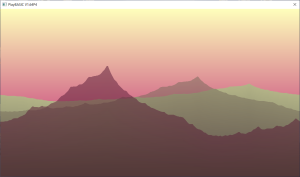
Parallax Sunset Terrain Demo (PlayBASIC Example)
Document Revision: V1.00


Q. What is this?


A. This little demo shows how you can create a classic multi-layer parallax scrolling effect using nothing but PlayBASIC’s 2D rendering features.

It procedurally generates a simple mountain silhouette using a midpoint subdivision technique, then draws several layers of terrain at different speeds and scales to give a sense of depth. Each layer fades naturally into the background using a fog-style color blend, while the sky itself smoothly shifts color over time to create a moody sunset atmosphere.


Q. What techniques are demonstrated?


* Procedural terrain generation with midpoint subdivision
* Multi-layer parallax scrolling
* Dynamic sky gradient animation
* Simple fog blending for atmospheric depth
* Real-time rendering using LockBuffer / UnlockBuffer
* Use of Timer() for smooth, time-based motion


Q. How do I use it?


* Space Key: Quit the demo


Q. Compatibility Notes


Runs in all modern PlayBASIC V1.64+ builds.


Q. Commentary


This example is a fun throwback to the early 90s demo scene aesthetic — those scrolling horizon effects that gave 2D games and intros their sense of motion and atmosphere. Despite its simplicity, the entire thing is done with just a few short functions, showing how much can be achieved with PlayBASIC’s built-in drawing and math commands.
2d-fractal-parallax-terrain.png
#1
2d - Fractal - Terrain - Parallax Final.zip (4.4 KB)

Prime Sieve Of Eratosthenes


PlayBASIC Code:
   STartTime=Timer()
      Count=SieveOfEratosthenes(250000)
   print Timer()-StartTIME
   print Count
   print "done"
   
   sync
   waitkey


Function SieveOfEratosthenes(Limit)
    Dim Primes(Limit)
    ClearArray Primes(),True
    
    Primes(0) = False
    Primes(1) = False

    For p = 2 To Sqrt(Limit)
        If Primes(p)
            For i = p * p To Limit Step p
                Primes(i) = False
            Next
        EndIf
    Next

    For i = 2 To Limit
        COUNT+=Primes(i)
    Next
EndFunction Count
COMMANDS USED: TIMER | PRINT | SYNC | WAITKEY | DIM | CLEARARRAY | SQRT |